

Call Ozdachs at 415.347.6479|info_request@ozdachs.biz

Sexy Bodies, Sex, More Sex, and Backups

Sexy Computer Back-UpsOkay, okay, reading about backing up your data files is not exciting and I am trying to trick you into taking action. Sex sells.

But, if you’re not enticed to action by the thought of hot juicy backups, let me revert to the other sure-fire sales technique: fear.

Everywhere I went on vacation over the summer I ran across people who were in trouble because they have no effective backups of the information on their computer.

Here are some conversations I had:

  • One friend has created a huge iTunes music library on her laptop PC.  She’s spent hundreds of hours feeding CD’s into the machine. She’s now getting strange errors when she runs her five-year-old laptop and she thinks its disk may be going bad. What will happen to her music if the disk crashes?
  • A fire destroyed 11 homes in the town I was visiting. A client said she regularly backs up her financial information to an external hard drive.  But, she wondered, how she could recreate her data if the flash fire had burned her home to the ground.
  • Another client was very proud how she backed up all of her digital photos to her home computer.  She said she unloads the camera every time she returns from vacation.  The fire got her pondering how many memories she’d lose if her PC picture depositary was incinerated.

Be Very Afraid

The short, succinct take-away from all these situations is that if you do have a copy of your music, financial information, or photos physically distant from your home, you are at risk of permanently losing important data or memories.

That truth isn’t sexy (unless you’re turned on by disaster scenarios).  But, face it. Your information could be irretrievably lost if you don’t have a remote backup of your files.

What Can You Do?

A basic solution is to do regular manual backups of all of your data and store them in a safe deposit vault or with friends or family in another town.  Buy a couple external disk drives, copy the information, and then ship a disk to your remote storage location.  Do it again next week, and have your friend ship you back disk #1. This is a very workable solution, but you have to back up regularly and stick to your schedule.

Why this solution didn’t work for me was that I needed to create a list of files to back up, and I had to keep adding and modifying the list as I changed information on my computer.  In addition, the manual process required me to be in front of the computer.  I had to drag the files to update and wait for them to copy. Then I had to the same thing for the next group of files.  Finally, I bought a backup program that let me synchronize the files on my internal drive and the external drive, but then I had to do that backup manually, update the file list, and manually run that back up.  Ugh.

What Should You Really Do? — Mozy

Mozy for Your Computer Backups

Try Mozy

Fortunately, a couple years ago the cost of backing up files over the Internet fell a lot.  I investigated a couple services and am now recommending Mozy.

Here’s why:

  • It backs up all data files on a computer for a fixed price.  Out of the box it backs up files in the default locations (like “MyMusic”), and you can specify any folders or individual files on your internal disk.
  • It backs up files in the background.  If you’ve changed a bunch of files, Mozy will upload them overnight or whenever you’re not using the computer.  You don’t have to do anything to start your back-up.
  • It backs up files to its remote site over secure connections on the Internet.  Your data will survive even if your PC is burned, damaged in an earthquake, or stolen.

The cost is pretty cheap, too. First you can try it out and backup 2GB of data for free. Then, it’s $5.99  a month (price updated 9/2012) for up to 50GB or $9.99/month for 125GB.

Mozy has features like allowing me to go get a single file from the backup.  So, if you accidentally delete a file, you can retrieve it easily.  Plus, Mozy keeps old versions of your files for 30- days..  The versioning feature will save your life you when accidentally update a Word document — say, erase the whole contents — and stupidly save the new version. Just get the original document back from Mozy.

What’s Not to Love? Or, Why Wait?

I know your disk drive won’t go bad today. Your home isn’t going to explode in a molten mess this week.  And, the 7.1 destructo earthquake isn’t due this year.

But, if your reading this and you don’t have a backup of your photos, music, or Quicken/QuickBooks data that is less than 7 days old, just stop it!  Stop denying that your data is at risk.  Try Mozy.  Or one of their competitors (contact me and I can give you more info). But, do something today.

My fear is having to see your face you after your disk drive has crashed, your data is gone, and it’s too late. Please do your backups so I can sleep soundly at night.

By |2012-09-27T16:42:05-07:00October 14th, 2010|Tips and Resources|0 Comments

How to Get the Internet Speed You’re Paying For

Speed Test logoDo you think your connection to the Internet is much slower than what you’re paying for?  Are you paying for  a “high speed” DSL or cable connection, but getting to sites, downloading songs, and everything on line takes forever?

There’s a two-step fix that works for me every time.

  1. Make sure the Internet is actually slow.

    It could be you.  Maybe you’ve had one too many lattes and the whole world cannot keep up with your mind. Or — more likely — there could be another issue with your computer that makes the Internet connection look slow.

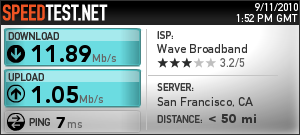
    Go to Speedtest.net .  That site provides a free, anonymous clocking of your internet speed.  See if your speed comes close to matching what the ISP says it will give you.

    My ISP plan is for speeds of 12Mb download and 1 Mb upload.  You can see from the graphic showing my test results that I am getting what I am paying for.

    But, I wasn’t when I started off the morning.

    In fact, when I first went to my keyboard  iTunes was predicting that it would take 20 minutes to download a song, and browsing regular web sites was painful because I was having to wait for each graphic to draw itself into the page.  When I first ran the Speed test my download speed was less than 1 Mb!

    That’s when I went to the next step:

  2. Turn off and Back On Your Router and/or Internet Modem

    Your home router is a computer — although a specialized one — that sometimes gets confused. Or busy.  Or something.

    Just like an old Windows machine, sometimes the router goes off by a bit.  And, just like an old Windows machine, the easiest (and maybe only) way to fix the problem is to reboot it.

    Just unplug the router from its power supply, count to 30, and plug it back in.

    This sophisticated, high tech solution works for me 99 times out of a 100.  The other 1 time in 100, I have to unplug and plug back in the power on the cable modem and also reboot my PC.  This combination has not yet failed to get me back to reasonable speed.

My home network is simple and uses a 2009 (fairly new) Cisco Router.  I should not have to worry about the router causing speed problems.  Really. It is annoying.  However, rather than spend days debugging and talking to tech support at Cisco, I am happy to use the one-two punch whenever I think the Internet is slow:

1. Make sure the problem is real, and 2. Reboot the router.

Of course, if rebooting both the router and the cable (or DSL) modem fails to get your speed up to what you’re paying for, then it’s time to call that ISP and tell them that they have a problem!

By |2010-10-09T13:44:51-07:00October 9th, 2010|Tips and Resources|0 Comments

Will You Do a Magazine Ad for Me?

Certified Public Accountant ad campaign post cardA client asked me to help him submit an ad for the premiere industry magazine of his client base. He’d recently redone his web site, and now he wanted to announce his available to take on new work by buying a full-color ad that mirrored the colors of his web presence. Could I help?

Well yes. And no.

Yes, I could help him prepare the ad to the specifications of the magazine. I looked at their ad guidelines, and I can put my client’s material into a format that the magazine wants.

My focus is on web design and Internet marketing, but I have created print advertisements for clients and have also designed direct marketing campaigns. The card pictured with this post was the first salvo in a five-part mail barrage sent out by one of my clients.

The “five-part mail barrage” is where the “no” comes in. My client has good instincts about buying an ad in an industry magazine. But, his chances of gaining business from a single ad are pretty slim. The blue bird of happiness may strike, and a prospective client could see the ad and jump to the phone. Frankly, though, that’s an unlikely scenario.

Successful marketing ad campaigns involve repetition.  Prospects have to get used to seeing your name, your product, your service, your offer.

An elementary school teacher friend says that kids have to be exposed to a fact five times before they can recall seeing it.  That principle holds for adults and advertisements.

Rather than have my client blow his budget on a one-shot-wonder ad, we talked about how to make the appearance in the magazine part of a barrage of information.  It turns out that he has been asked to present workshops at the major annual conference for his clients’ industry next spring.

Perfect!  We talked about how to leverage his seminar appearance to make his single ad effective.  By the time prospective clients see his name in the event announcement, see his name in the program, see his name on the presentation room doorway, and see his panel name card, his magazine ad can be memorable.  “Oh, yeah. Wasn’t he the guy from the conference?”

Yes, I would be delighted to craft a print or direct mail ad for you.  Of course.  But, before you spend your money with me and the publisher, let’s have an effective, multiple mention campaign mapped out.

By |2010-10-05T13:39:11-07:00October 5th, 2010|Marketing|0 Comments
Go to Top