

Call Ozdachs at 415.347.6479|info_request@ozdachs.biz

Know The Truth About “Domain Name Search Engine Registration”
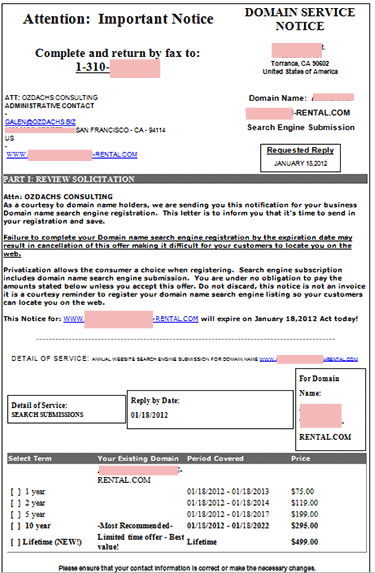
Sleazy Domain Registration Service Email

Sleazy Domain Registration Service Email

There is a special circle of hell reserved for people who send emails like the one reproduced at right. These are the scary-looking “NOTICES” that take advantage of a business person’s unfamiliarity with the technical terms of the Internet.  The messages try to get an unsuspecting website owner to buy a horribly overpriced, maybe worthless, service.

This particular email was sent to me on January 17th asking me to reply by January 18th.  The sender is creating a false sense of urgency to get me to act before I figured out what I was doing.

The formatted electronic letter says it’s a “Domain Service Notice”.   It looks like the senders are trying to trick you into thinking that you need to renew your site’s domain name registration.  Domain name registration is a real service. Domain name registration is what records you as the owner of your www.ozdachs.biz and tells everyone on the Internet where to go to see the site.  Domain name registration for .com domains currently costs under $20/year from reputable registrars.

This message is not selling domain name registration.  They are offering “Domain name search engine registration.”  I don’t know what that is.

I suspect that it is a made up product with no commerical value for your website.

You don’t have to register your domain with places like Google or Bing.  Those search engines find and read all of the pages of your site and put you in search results for free.  You can submit your site to Google, but that really isn’t necessary.  Google will find your site through in-coming links from other sites it knows about.  (You have to make sure that your site gets pointed to, but that isn’t difficult.  Writing a public post on Facebook or in a blog like this is enough!)

At most, you might submit a new website to the major search engines to try to kick-start its visibility.  Most experts don’t think you need to do this, but the search engines generally let you tell them about your site.  For free.

In any case, I cannot think of a reason why you would need to submit your site more than one time, when it is new.  Google and the other search engines regularly revisit the sites they’ve found to process and reindex the new content that’s published.

This come-on letter offers you a one-year “registration” for $75.  The senders say their “best value” is a lifetime service for $499.  I have no idea what you get for multiple years of the service.

Unfortunately some people will fall for this urgent-sounding pitch. Its wording is carefully legal: it says straight out that it’s not an invoice and you are under no obligation to pay. But, the message is skillfully formatted and it looks so official!

Luckily this sleazy message came directly to me because I am listed on the real, official domain registration for a client.  My client didn’t have to panic, and he didn’t waste his money. I know what to do with offers like this: trash them!

If you have any questions about you get in your email or USPS box, talk to me or your webmaster.  Don’t pay for a service you don’t understand!

By |2012-01-31T11:25:20-08:00January 31st, 2012|Domain Names|59 Comments

Don’t Put Your Data Back-up THERE!

My lunch Friday was with a professional who stores a lot of sensitive data on her office computers.  She keeps her client’s names, investment transactions, social security numbers, and other sensitive data in unencrypted files while she does work for them and for archival purposes.

We talked about how she had to wear so many different hats because she was running her own office.  Not only does she provide the professional advice her clients pay her for, she also has to be office quartermaster, bookkeeper, publicity agent, etc., etc., and IT manager.  She said that her computer set up was very simple, and that triggered me to launch into my evangelical discussion on backing up computer data.

She agreed with me completely that back-ups were critical.  She explained that she runs backups every week and makes two copies.  One copy she keeps in her office on an external hard drive and she keeps another copy on a thumb drive which she puts in her handbag and keeps it with her wherever she goes.

She, like me, is worried about an office fire or an earthquake which would destroy backup disks kept in the office.  Or, maybe the office would simply be inaccessible for a few weeks due to a structural problem triggered by the fire, earthquake, or even terrorism near her downtown location.  In either case, she said, she wanted to have a copy of her data with her so she could set up shop at her house or another location if there was a physical problem with her office.

I tried to ask gently if she had considered backing up over the Internet.  She had, she said, but was worried about how secure cloud backups were.  She just didn’t know if  information sent through the Internet could be kept private and if the people receiving the information on the other end could be trusted.

Protect Your Business
Mmmmm!… I couldn’t think of reasonable questions to ask her. I was more directive than Socratic. Here’s what I shared:

First, keeping a thumb drive full of easily readable information in a target for thieves — your handbag — is truly not a good practice! We’ve all heard news stories of some credit bureau employee’s laptop loaded with data being stolen from their car or from a coffee shop.  Handbags are traditional targets of theft and sensitive information should not be routinely kept there.

Second, professional back-up software encrypts your files before they are shipped off to the backup center.  What goes out to the Internet is unreadable digital gibberish. The data centers themselves are protected with best-practices security precautions.

Third, I cannot personally guarantee that all of your data will be 100% secure if you backup with one of the major backup services.  I am not a security expert.  I didn’t examine and test the services’ encryption techniques, nor am I qualified to evaluate the physical and technical security of the storage data centers.  You’re not a security expert, either. But, the companies who hold themselves out to be expert in data security and backups are willing to risk the liability of saying that your data is safe.  Two of them, Mozy and Carbonite, are industry standards for home and small business.  Since you are not an IT security expert, I think you should rely on the industry-standard-setting companies’ security assurances.

Fourth, you want your backups to occur automatically and more frequently than weekly. Automatically because when you’re busy and changing a lot of data, you’re the most likely to forget to do the backup and you’re the most likely to resent the time you spend on the manual process.  More frequently than weekly because you probably cannot afford to lose a week’s worth of work!  Once again, Mozy’s and Carbonite’s products solve the problem.  Each continuously examines your hard drive and backs up new and changed files.

After my diatribe, my friend said said she would go back to her office and sign up for a cloud back-up service that afternoon.  I think I convinced her and she was really going to do it.  Of course, she just might have been trying to get away from the crazed zealot she’d been dining with.


By |2012-01-22T06:51:29-08:00January 21st, 2012|Tips and Resources|2 Comments

The Secrets of an Anal-Retentive Webmaster

Webmaster at Work

Ozdachs Updating a Site

I was up on New Year’s morning, changing copyright dates on websites before noon.

Yes, I am anal retentive, an anal-retentive web master, and I know when to use a hyphen.

I am also evangelical about making websites look fresh.

You don’t have to compete with me on editing your website before noon on January 1st. But, please consider these two compelling reasons to do a January cleaning of  your site:

  1. Your potential clients want to know that what they’re reading is current.
    Most Internet visitors get queasy when they see “Happy Holidays” in February or “Enjoy Your Summer Vacation”  in October.  The unease turns to nausea in May and December.

    When I see a copyright date on a site that is years old, I personally wonder if the business is still active and if the information I am reading is still valid.  Intellectually I may know that the directions to a business would not have changed in the past three years.  Still, if the “Find Us” page is dated 2009, a powerful, if irrational, warning trips in my animal brain.  I want to flee to a safer, newer place.

  2. Google ranks pages with fresh content more highly than static pages.
    When Google crawls your site it finds out the date each page was last updated.  It uses the modification date to give an extra boost to pages that were recently changed.  Editing the visible copyright date on each page will make Google think that the pages are recently changed and deserving of extra attention.

If you find yourself getting into the freshening-up mode, here are a couple more tips to keep your site looking evergreen:

  • Only date material – even customer testimonials or company news – when you are anal-retentively committed to changing the information frequently. When the website includes praise from a client dated January 1, 2011, by January 1, 2012 it looks like you haven’t satisfied a customer in over a year.
  • Remove any “Last Updated” notices on your web pages. That type of bragging was automatically added to pages using older HTML authoring tools like FrontPage, but those statements are no longer in style.When the page was last updated yesterday, those messages look great.  But,  the whole page looks suspect when the date posted is a couple years in the past.

Finally, for more information about what you should put in your copyright notice,  read the official US Copyright Office rules.

By |2012-01-04T16:05:04-08:00January 4th, 2012|Web Design|0 Comments
Go to Top