
Call Ozdachs at 415.347.6479|info_request@ozdachs.biz

What You Learn from Dog Poopbags Can Grow Your Business

Poop Bags from Poopbags.comThis weekend as I was buying dental chews for our dogs, I had a revelation. Poopbags.com had, without my intention, made me a loyal customer.

Here’s how it happened…

When I shop online for things like dental chews, I go to Google, type in the product I’m looking for, and shop by price. That’s what I was doing Saturday.

In the past I have bought chews and toys from many different online vendors.  Each seller has been reliable and has delivered the purchases quickly and without a problem.

Despite my good experiences, I feel no loyalty to the different sites. Each time when I want a specific product, I Google it, and buy from the least expensive store.

Googling, comparing, and buying is what I do.

And, then I went to purchase more disposal bags for the dogs.  I just typed in www.poopbags.com and bought a three-month supply.

Why do I act differently when I need to restock biodegradable “plastic” bags for our dogs?  I know that there are many sites that sell them — when I first decided to buy them online I sorted through a raft of competing sites. But, I don’t Google and price shop for refills.  I just go to Poopbags.com.

I mulled my inconsistent behavior. I figured out that the reason I go to Poopbags.com is that they send me regular newsy updates about what they’re stocking, what canine charities they’re supporting, how their own dogs are doing, and other chatty stuff.  I feel like I know the owner, even though we’ve never met.

Not only that, but their monthly (or so) email newsletter keeps their name in my mind. Okay, their in-your-face name makes it unlikely that I am going to forget their name. But, the point is I think of them as “my” supplier because they send me fun information frequently. Their communications are not really sales tools, but marketing. That is, I don’t think I’ve immediately bought more bags when I’ve gotten one of their emails, but I am sure that a few of the messages have gotten me to review the supply downstairs to see if was time to order more.

If you’re not making clients think of you as their supplier, take a lesson from Poopbags.com. Start sending them bits of fun facts, specials, and information on a regular basis. Start up — and maintain — an electronic newsletter.


Yes, an electronic newsletter will work in your industry. I mean, is there any more unlikely field of commerce for an electronic newsletter than Poopbags.com’s?

I use Constant Contact as the newsletter service for most of my clients. They have excellent, US-based telephone support and have been reliable and mostly trouble-free for years. Constant Contact allows you to send unlimited email to people on your mailing list. They charge by the size of your list, and most of my clients are paying $30 a month.

Grow your business with email marketing!VerticalResponse is another good emailing service.
They charge for each individual email message sent out, and they are much more economical if you send to a lot of email addresses infrequently.

Either Constant Contact or VerticalResponse are fine choices to get you started becoming your clients’ favorite business. You won’t go wrong with either… the only mistake you can make is to poop out and fail to set up regular email communications to clients.

Really, if Poopbags.com can disrupt my Googling pattern and get me to go directly to them, imagine how your newsletter will help you with your clients.
By |2010-11-09T08:32:58-08:00November 9th, 2010|Marketing, Newsletters|3 Comments

3 Ways to Track Visitors to Your Site

Now that you’re the proud owner of a web site, the obvious question is “Does Anyone Care?”

Here are three types of tracking services for small and medium web sites. Each has their pros and cons in how they tell you who is visiting your web site.

  • Statistics from the Web Hosting Service
    Web Hosting Service Statistics

    Web Hosting Service Statistics

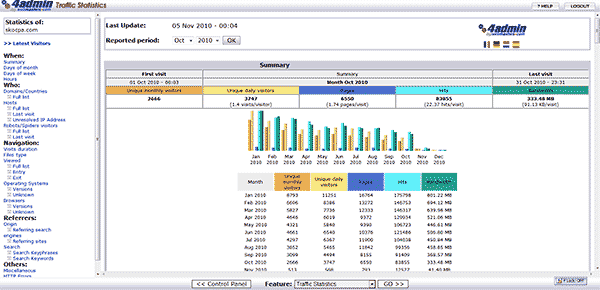
    Some form of statistics information comes with most web hosting packages. Typically, the types of information that can be retrieved is limited and based on log files which are at least a day old. A limitation in the report above, for example, is that the information is returned for calendar months. You cannot do any analysis based on weeks or quarters without doing your own calculation.  On the other hand, the service is free (included in your hosting costs), and you get the most important information such as the total number of visitors and how they got to your site. You also don’t have to do anything to start collecting statistics. They’re generated automatically from the hosting service’s log files.

    To access your free statistics, you log on to your site’s hosting control panel and look for the link to “visitor traffic” or other similar wording.

  • Google Analytics

    Google Analytics

    Google Analytics

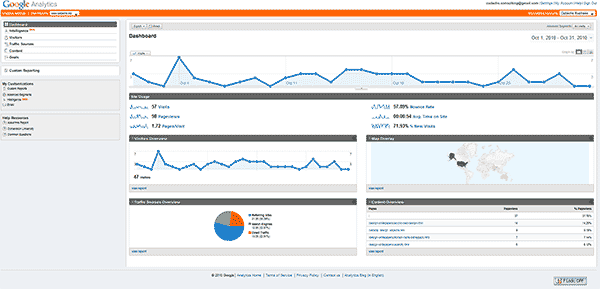
    Google provides free tracking information about visitors to your site which generally provides a bit more flexibility than your hosting service.  Their service lets you select specific date ranges and it gives you more insight about the number people who just view one page and leave and what the most popular entry and exit pages are.

    Installing Google Analytics is pretty simple.  You register for the service at Google and select one of the ways Google gives you to verify that you’re the owner of the site.  Our favorite verification method is to install a dummy web page of a specific name that Google picks.

    There are a few shortcomings with Google’s service, though:

    • Google’s statistics are a day old.  So, if you are an active advertiser you won’t be able to see up-to-the-minute results of your ad campaigns.
    • Google isn’t giving a complete picture of site activity.  Their page-to-page in-site tracking is just being beta tested, and their information on referring sites, search terms, and other details is tabular and not easily deciphered.
    • Google tracks your visitors from your site to other sites.  If your visitor goes to one of your pages about a topic like “cameras” when that visitor later goes to another site that displays Google’s ads, Google may display “camera” ads to them.  This means that when you use Google Analytics, you may be helping your competitors advertise to your potential clients.

    You access Google Analytic statistics by logging on to your account at Google.

  • HitsLink (or other 3rd Party) Tracking Service
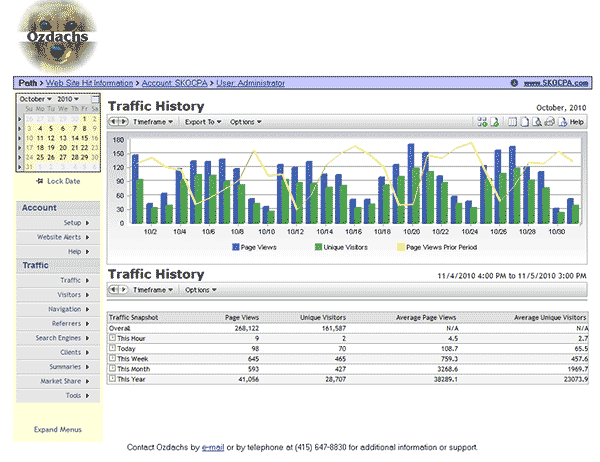
    HitsLink Statistics Display

    HitsLink Statistics Display

    I use HitsLink, a third-party statistics reporting package, for my clients who have the most demanding reporting needs.  The reports are detailed, flexible, and delivered in both tables and graphs.  The information is also reported in real time:  visit your own site, refresh the visitor report, and you’ll see the counter go up by 1.

    The only drawbacks to HitsLink are modest:

    • You have to add code to each web page you want tracked.  The script is provided by the tracking service, and you cut and paste it into each source page — they have a utility that will update all of your pages, if you’d like.
    • The service costs approximately $10 a month.

    You access HitsLink statistics by logging on to your account on their site.

The Bottom Line

Most small business and people with personal sites are going to be happy with the free choices from their hosting service or Google Analytics.  Free is an unbeatable price.

On the other hand, if you are competing for clients on the Internet you may want up-to-the-second visitor information.  Or, you may not want Google to send your competitors’ ads to your hard-earned visitors.  In that case, opt for HitsLink or another service you pay for.  (More information on HitsLink)

By |2010-11-06T11:32:39-07:00November 6th, 2010|Tips and Resources|0 Comments
Go to Top